
Email Marketing Benchmark Report Q2 2025
Discover the latest trends in email marketing performance with our quarterly benchmark report, including key metrics, industry insights, and expert analysis.

Zeta Global Teams Up with Fireworks to Unveil New Specialized Athena Inference Models Using NVIDIA NemotronRead News
“Received too many emails” has perennially been one of the top reasons consumers unsubscribe. Google is clearly trying to address this complaint with the “Manage Subscriptions” functionality it launched in Gmail last year and rolled out over the course of subsequent months.
However, the functionality is hampered by flaws that limit its usefulness for consumers, while at the same time arbitrarily punishing some marketers.
Accessible through Gmail’s menu, this feature provides a centralised dashboard to view and manage all active email subscriptions. Senders are grouped by frequency (e.g., 20+ emails recently, 10–20 emails recently, or 10 or fewer emails recently) and listed alphabetically, with each sender address used by a brand listed separately.
Users can opt out via a one-click “Unsubscribe” text link that’s powered by list-unsubscribe functionality. This typically bypasses brand unsubscribe pages and preference centers.
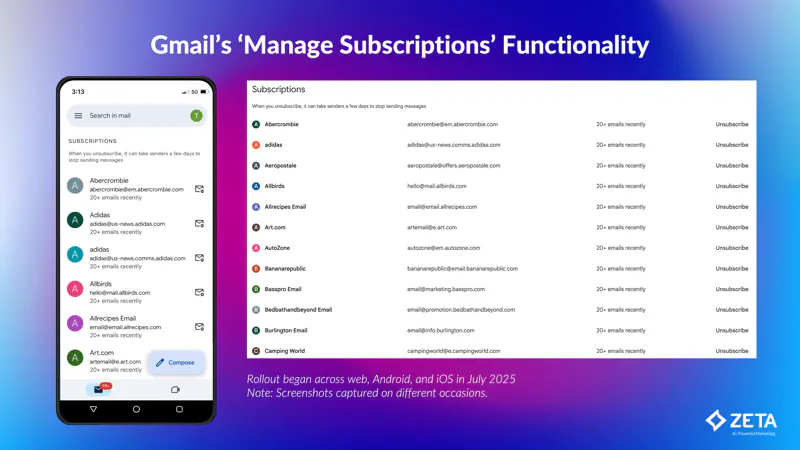
Centralised visibility of email subscriptions makes it easier for disengaged users to unsubscribe.
Along with other efforts, such as the unsubscribe prompts Gmail triggers after 30 days of inactivity, Manage Subscriptions likely reduces brands’ spam complaints and increases their engagement rates by encouraging disinterested subscribers to unsubscribe.
Gmail’s Manage Subscriptions functionality presents three significant challenges for marketers.
Because Manage Subscriptions organises senders first and foremost by their sender frequency, it conveys the message to Gmail users that unsubscribing from the senders at the top of the list will reduce the number of emails they receive the most. However, this often isn’t true for two reasons.
First, there are huge variations in frequency in Gmail’s top bracket of 20+ emails recently. That’s because, even though Google doesn’t disclose it, “recently” appears to be in the range of 3-4 months.
That window is so large that some senders in the top 20+ emails recently bracket end up having only sent 21 or so emails during the period, while others sent more than 100. That’s a massive range for senders who are presented as being equal in terms of sending frequency.
Second, senders are listed alphabetically within each bucket. This puts senders with names that start with letters early in the alphabet at a significant and unwarranted disadvantage compared with senders with names that fall later in the alphabet.
Use distinct sender names and addresses for different mailstreams to avoid landing in the 20+ emails recently group. Those mailstreams could be for different kinds of promotional messages (e.g., promotions, newsletters, events) or for different lines of business or departments.
Prior to this, it was already best practice to have your (1) promotional, (2) transactional, and (3) other automated emails separated from each other by sender email address. Manage Subscriptions gives brands another reason to do that and then take it a step further and separate out major promotional mailstreams, too.
Lean into email frequency optimisation, including inactivity management and fatigue analysis. More than ever, it’s important to right-size email frequency according to subscriber and customer engagement. Highly engaged people should receive more messages, while less engaged ones should receive fewer until they show more engagement. Zeta’s Strategic Services team has shown repeatedly that email marketing revenue can be increased while reducing overall email volume by optimising email frequency across subscriber engagement deciles.
Gmail’s Manage Subscriptions functionality has distorted unsubscribe rates across the email marketing industry. In many cases, senders’ unsubscribe rates have jumped by 200% or even 300%.

However, that spike in unsubscribes is mostly an illusion. That’s because Gmail is submitting multiple unsubscribe requests every time someone clicks a list-unsubscribe link in Manage Subscriptions. This is inflating total unsubscribe rates, which had previously been identical to unique unsubscribe rates, since humans rarely click an unsubscribe link more than once.
Stripping out the redundant unsubscribes from the total shows that unique unsubscribe rates are up only modestly in the wake of the introduction of Manage Subscriptions.
Monitor unique unsubscribes, not total unsubscribes, which this Gmail feature artificially inflates.
The third problem with Manage Subscriptions is that it violates a core rule of email:
Unlike spam complaints, unsubscribes don’t affect a sender’s deliverability.
This rule is broken because when someone unsubscribes via Manage Subscriptions and then later re-subscribes to that brand’s emails, those emails are then routed to the spam folder. That absolutely should not be happening.
Unfortunately, as with many other recent inbox provider changes, sometimes there’s nothing marketers can do. However, our hope is Google will fix the deliverability problem caused by Manage Subscriptions and also address some of the feature’s other shortcomings.
Giving consumers control over their inbox is always a good thing, but the execution of Manage Subscriptions so far has not lived up to Google’s usual high standards.

Zeta Marketing Platform
Create individualised experiences and drive outcomes throughout the customer lifecycle.

Zeta Messaging
Create enhanced email and mobile customer experiences with AI-powered personalisation.
Discover the latest trends in email marketing performance with our quarterly benchmark report, including key metrics, industry insights, and expert analysis.
The Zeta Marketing Platform empowers businesses to offer highly tailored experiences driven by AI.